Blog
YouTube Channel Banner Size and Safe Area (2026)
By ytbench team · Updated 2026-09-26
The YouTube channel banner size is one of the few specs where the upload and what people see are different shapes. You upload a 16:9 picture; most viewers see a thin strip cut from its middle. Getting a banner right is mostly about knowing where that strip falls.
YouTube Channel Banner Size Requirements
These come from YouTube's channel branding help page, checked on 2026-09-26:
| Recommended size | 2560×1440 px (YouTube says: especially for TV) |
| Minimum size | 2048×1152 px |
| Aspect ratio | 16:9 |
| File size | 6 MB or smaller |
| Safe area for text and logos | 1235×338 px, measured on a 2048×1152 image |
| Style | No extra embellishments such as shadows, borders, or frames |
Notice that the recommended YouTube channel banner size and the safe area are given on different canvases. That mismatch is one reason banner guides disagree about the safe area's pixel size — the next section works it out on the canvas you'll actually use. If your design tool starts from another preset, keep the 16:9 ratio and at least 2048 px of width; the proportions below still apply.
The Safe Area, Drawn to Scale
YouTube only publishes the safe area for the minimum 2048×1152 image. The recommended canvas is exactly 1.25 times larger in each direction (2560 ÷ 2048), so the same area on a 2560×1440 canvas is about 1544×423 px — 1235 × 1.25 = 1543.75, and 338 × 1.25 = 422.5. That is our proportional conversion, not a number YouTube publishes, but it describes the same region:
In proportions, the safe area is the middle 60% of the width and the middle 29% of the height, whatever size you design at. That is a narrow target: on a 2560×1440 canvas, roughly 508 px on each side and 508 px above and below it may be cropped away on some screens.
What TV, Desktop and Mobile Show
One upload feeds every screen, and each one crops it differently:
| Screen | What it shows | Published pixel size |
|---|---|---|
| TV | The whole 16:9 image | 2560×1440 recommended upload |
| Desktop | A wide strip through the middle, about 6:1 | Six fixed crops served, largest 2560×424 |
| Mobile | A strip through the middle | Not published by YouTube |
We don't list a mobile pixel size because YouTube doesn't give one, and there is no separate mobile upload. What YouTube does promise is that the safe area appears on every device, so a banner designed around it works on phones without knowing the exact crop.
Upload 2560×1440, Get Back 2560×424
The desktop crop is the only one you can inspect directly: YouTube serves it publicly in six fixed sizes. We ran @mkbhd through our YouTube Channel Banner Downloader to see what a well-designed banner looks like after the crop:
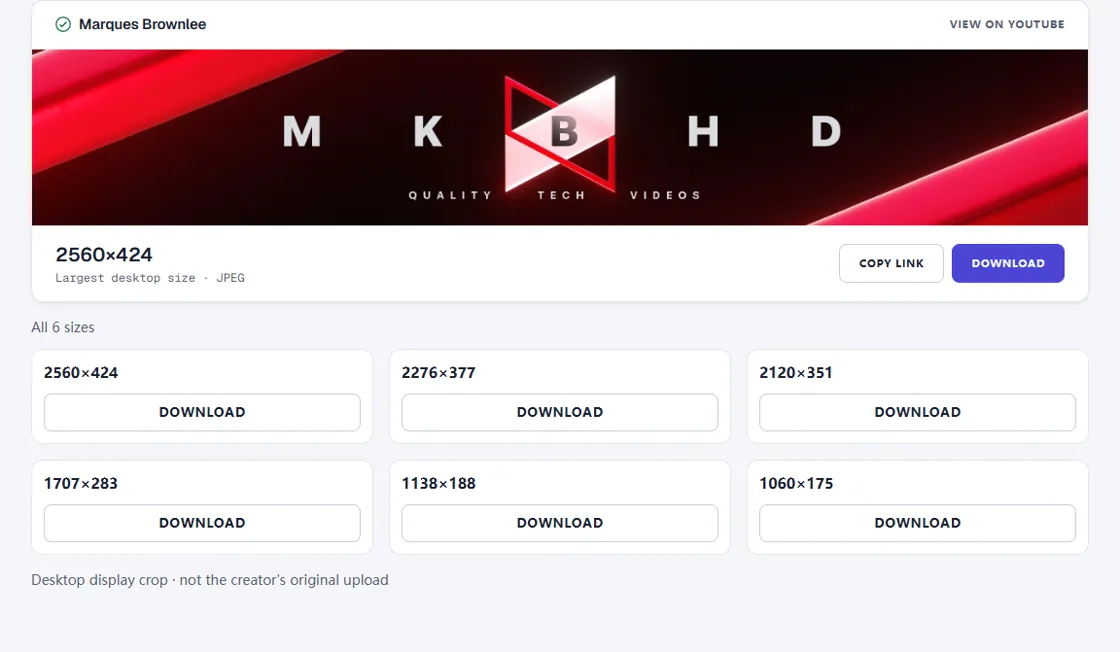
Two things in that result line up with the safe area. The largest desktop crop is 424 px tall — one pixel more than the 423 px safe-area height we calculated, so on desktop the visible strip is about as tall as the safe area, just full width. And the MKBHD wordmark spans roughly 24% to 77% of the banner's width, inside the 20%–80% band the safe area covers — the part YouTube says every device shows.
The flip side: everything above and below that strip — about 70% of the canvas height — is outside the safe area, and TV is the only screen guaranteed to show it. It should still look finished, because TV viewers see all of it, but it can't carry anything a desktop or phone viewer needs.
Two Ways Banners Go Wrong
Most broken banners match the YouTube channel banner size exactly and still fail, because they were designed for one screen. The first kind is built as a wide strip, the way it looks on a desktop, and then stretched or padded to 16:9 for upload. On a desktop it looks fine. On a TV, where the whole canvas shows, it sits in a band across the middle with empty or blurred space above and below.
The second kind is built as a full 16:9 picture, with the channel name near the top and social handles in a corner. It looks great on a TV and in the editor, then loses its text on every desktop and phone, because those screens only show the center strip. The fix for both is the same order of work: design the whole 2560×1440 canvas so the TV view is complete, then move every word and logo into the middle 60% × 29% before exporting.
Design Checklist
- Start from a 2560×1440 canvas; never go below 2048×1152.
- Mark the center 1544×423 block (60% × 29%) before you design, and keep the channel name, logo, and any schedule text inside it.
- Fill the rest of the canvas with background that looks complete on its own, for TV viewers.
- Skip drop shadows, borders, and frames — YouTube asks for no extra embellishments.
- Export under 6 MB. A JPG at this size usually fits; a detailed PNG may not.
- After uploading, check the 2560×424 desktop crop with the banner downloader to confirm nothing was cut.
Picking the rest of your channel images too? See the YouTube profile picture size guide and YouTube thumbnail size and dimensions. Each follows the same rule as the YouTube channel banner size: check YouTube's spec, then check what YouTube actually serves.
Frequently Asked Questions
What is the YouTube channel banner size?
YouTube recommends 2560×1440 px, especially for TV, and requires at least 2048×1152 px at 16:9. The file must be 6 MB or smaller.
What is the YouTube banner safe area?
YouTube's figure is 1235×338 px on a 2048×1152 image — the center strip every device shows. Scaled to a 2560×1440 canvas that is about 1544×423 px (our conversion; YouTube doesn't publish it), or the middle 60% of the width and 29% of the height.
Why is my YouTube banner cut off?
Only TVs show the whole 16:9 image. Desktops and phones show a horizontal strip through the middle, so anything outside the safe area can be cropped away. Move text and logos into the center strip.
What size is a YouTube banner on mobile?
YouTube doesn't publish a pixel size for the mobile crop, and there is no separate mobile upload. Phones show a strip through the middle of the same image, so design for the safe area and it will survive.
Can I download a YouTube banner at its full 16:9 size?
No. The public files are desktop crops, from 1060×175 up to 2560×424, not the 16:9 upload. Our YouTube Channel Banner Downloader lists all six.
Sources
- YouTube Help — Manage your channel branding
- YouTube Help — Channel banner & profile picture tips
Last verified: 2026-09-26