Blog
YouTube Profile Picture Size (2026): Official Specs & Served Sizes
By ytbench team · Updated 2026-09-26
The YouTube profile picture size question has a surprising answer: YouTube doesn't publish one recommended pixel size for it. Banners and thumbnails do have official numbers, but they differ from what most size charts repeat. This page puts the three side by side, using YouTube's own help pages for what to upload and our own downloader tests for what YouTube actually serves.
Those are two different questions, and mixing them up causes most of the confusion. The upload spec tells a creator what file to give YouTube. The served sizes are what YouTube turns that file into — resized, cropped, and re-compressed for every screen. A banner uploaded at 2560×1440, for example, never appears on a desktop channel page at that shape.
YouTube Profile Picture Size
A channel's profile picture — also called its avatar, PFP, or channel icon — is the circle next to the channel name on every video, comment, and channel page. It is the smallest image on this list and the one viewers see most often.
Official YouTube Profile Picture Size Requirements
YouTube's channel branding help page lists three things: the file must be JPG, GIF, BMP, or PNG (no animated GIFs), it must not exceed 15 MB, and it renders at 98×98 px. That's it — no minimum width, no recommended resolution. A separate tips page adds that a square or round image works best.
The widely quoted 800×800 YouTube profile picture size comes from YouTube Music's artist avatar spec, not from the channel profile picture page. It's still a sensible target: 98×98 is only the base display size, and YouTube serves the same image larger on channel pages, high-density screens, and TVs.
What YouTube Actually Serves
Our YouTube PFP Downloader reads the file on YouTube's CDN and measures it. Alongside the original, YouTube serves fixed sizes of 800×800, 240×240, and 88×88. When the original is smaller than a requested size, YouTube stretches it — the file downloads fine, but it holds no extra detail, so the tool labels it Upscaled.
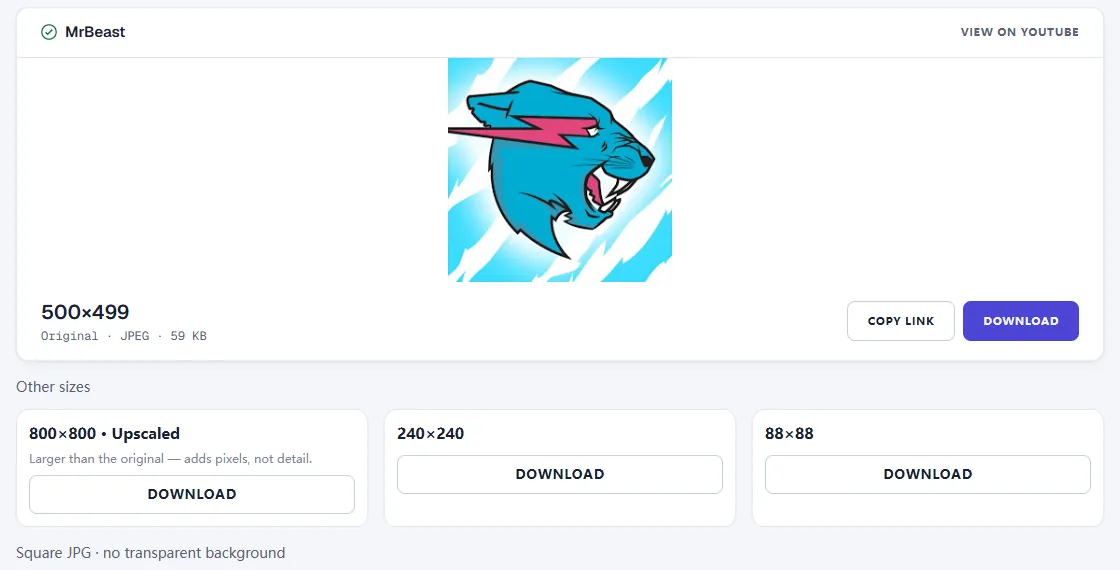
The example above is one of the largest channels on YouTube, and its original is only 500×499. Big channels upload small avatars all the time, because at 98 px nobody notices — until the image is shown larger.
Safe Zone and Cropping
Whatever YouTube profile picture size you upload, the image is stored as a square and displayed as a circle, so the four corners are always cut off. Anything important — a face, initials, a logo mark — belongs in the middle. Thin text disappears at 98 px; if the logo includes a wordmark, a simplified icon usually reads better.
To check an upload afterwards, paste the channel into the PFP Downloader. It reports the real size of the original file, so you can see at a glance whether YouTube received the large square you exported or an older, smaller file. If the 800×800 size comes back labeled Upscaled, the original is smaller than 800 px and worth replacing. The check takes a few seconds and needs no login.
YouTube Thumbnail Size
YouTube now recommends 3840×2160 px for video thumbnails (16:9, at least 640 px wide) and 2160×3840 for Shorts, yet the largest thumbnail file it serves publicly is still 1280×720. Our guide to YouTube thumbnail size and dimensions compares the three common export sizes to scale and shows what a real Short serves.
YouTube Channel Banner Size
The banner needs a 16:9 upload of at least 2048×1152 px (2560×1440 recommended), 6 MB or smaller. TVs show the whole image, while desktops and phones show only a center strip, so text and logos belong in the safe area. Our YouTube channel banner size guide draws that safe area to scale.
Quick Reference Table
Every YouTube profile picture size, thumbnail size, and banner size from this page in one table:
| Image | Upload spec | File limit | Largest served |
|---|---|---|---|
| Profile picture | No official pixel size; renders at 98×98 | 15 MB | Original (800×800 fixed size) |
| Thumbnail | 3840×2160 (16:9), min width 640 | 50 MB desktop / 2 MB mobile | 1280×720 |
| Shorts thumbnail | 2160×3840 (9:16), min height 640 | 50 MB desktop / 2 MB mobile | 1080×1920 |
| Banner | 2560×1440 (min 2048×1152) | 6 MB | 2560×424 desktop crop |
Common Mistakes
Uploading a Tiny Profile Picture
This is the most common YouTube profile picture size mistake. Because the icon looks fine at 98 px, a small or old logo file often goes unnoticed. It shows up blurry once a viewer opens the channel on a TV or a high-density phone screen. Starting from a large square file costs nothing.
Assuming a Downloaded File Is the Original
Every public download is YouTube's processed copy: thumbnails top out at 1280×720, banners arrive as desktop crops, and profile pictures may be upscaled. If you need the original, ask the creator.
Frequently Asked Questions
What size should a YouTube profile picture be?
There is no single official YouTube profile picture size in pixels. The official requirements are a JPG, GIF, BMP, or PNG file (no animated GIFs) no larger than 15 MB, and the image renders at 98×98 px. A square image of at least 800×800 px is a safe choice because it stays sharp when YouTube shows it larger than 98 px.
Why does my YouTube profile picture look blurry?
Usually the source file was too small. YouTube serves the same image at several sizes, and when a requested size is bigger than the original upload, the extra pixels are stretched rather than added. Upload a larger square original, and keep text and faces away from the corners, because the image is cropped to a circle.
What is the best YouTube thumbnail size?
YouTube recommends 3840×2160 px at 16:9, at least 640 px wide; the largest file it serves is 1280×720. See YouTube thumbnail size and dimensions for the full comparison.
What size are YouTube Shorts thumbnails?
YouTube recommends 2160×3840 px at 9:16 for Shorts, and the vertical file it serves is 1080×1920. See YouTube thumbnail size and dimensions for a real example.
What size should a YouTube banner be on mobile?
There is no separate mobile upload: phones show a center strip of the same 2048×1152-or-larger image, so keep text inside the safe area. See YouTube channel banner size for the safe area drawn to scale.
Can I download a channel's banner or profile picture at full size?
You can download the files YouTube serves publicly. Our YouTube PFP Downloader finds the real original profile picture size, and the YouTube Channel Banner Downloader lists all six desktop banner crops. The banner files are YouTube's desktop crops, not the creator's original 16:9 upload.
Check the Sizes on a Real Channel
Paste any channel or video link into our free tools to see the exact files YouTube serves: profile picture, channel banner, or video thumbnail. No login required.
Sources
- YouTube Help — Manage your channel branding
- YouTube Help — Channel banner & profile picture tips
- YouTube Help — Add custom thumbnails on YouTube
- YouTube Music Help — Set your artist avatar
Last verified: 2026-09-26