Blog
YouTube Thumbnail Dimensions and Size (2026): Upload vs Served
By ytbench team · Updated 2026-09-26
Search for YouTube thumbnail dimensions and most answers say 1280×720. That was YouTube's old recommendation. The current one is three times larger in each direction — yet 1280×720 is still the biggest thumbnail file anyone can download. Both numbers are right; they answer different questions.
YouTube Thumbnail Dimensions at a Glance
These are the official upload specs from YouTube's custom thumbnail help page, checked on 2026-09-26:
| Videos | Shorts | Podcast playlists | |
|---|---|---|---|
| Aspect ratio | 16:9 | 9:16 | 1:1 |
| Recommended size | 3840×2160 | 2160×3840 | — |
| Minimum | 640 px wide | 640 px tall | — |
| File types | JPG, PNG | JPG, PNG | JPG, PNG |
| File limit | 50 MB computer / 2 MB phone | 50 MB computer / 2 MB phone | 10 MB |
Of these YouTube thumbnail dimensions, the minimum matters more than it looks. A thumbnail narrower than 640 px falls below YouTube's minimum, and a file uploaded from a phone has to stay under 2 MB — a 3840×2160 PNG often won't, so export it as JPG.
3840×2160 vs 1920×1080 vs 1280×720
All three sizes are 16:9, so any of them uploads without cropping. The difference is how much detail survives. Here they are at the same scale:
The gap between the outer box and the inner one is the part of your upload nobody can download: whatever YouTube does with the full-size original isn't public, and the public thumbnail files stop at 1280×720. If you design at 3840×2160, the 1280×720 copy is an exact one-third reduction, which keeps edges clean. 1920×1080 scales by two-thirds, which is fine for photos but can soften thin text.
So which YouTube thumbnail dimensions should you export? Follow the recommendation: 3840×2160 when you can, 1920×1080 or 1280×720 when file size forces it. Nothing larger than 3840×2160 helps.
YouTube Shorts Thumbnail Size
Shorts flip the canvas. YouTube recommends 2160×3840 at 9:16, with a minimum height of 640 px. To see what that turns into, we ran a real Short from YouTube's own channel through our YouTube Thumbnail Downloader:
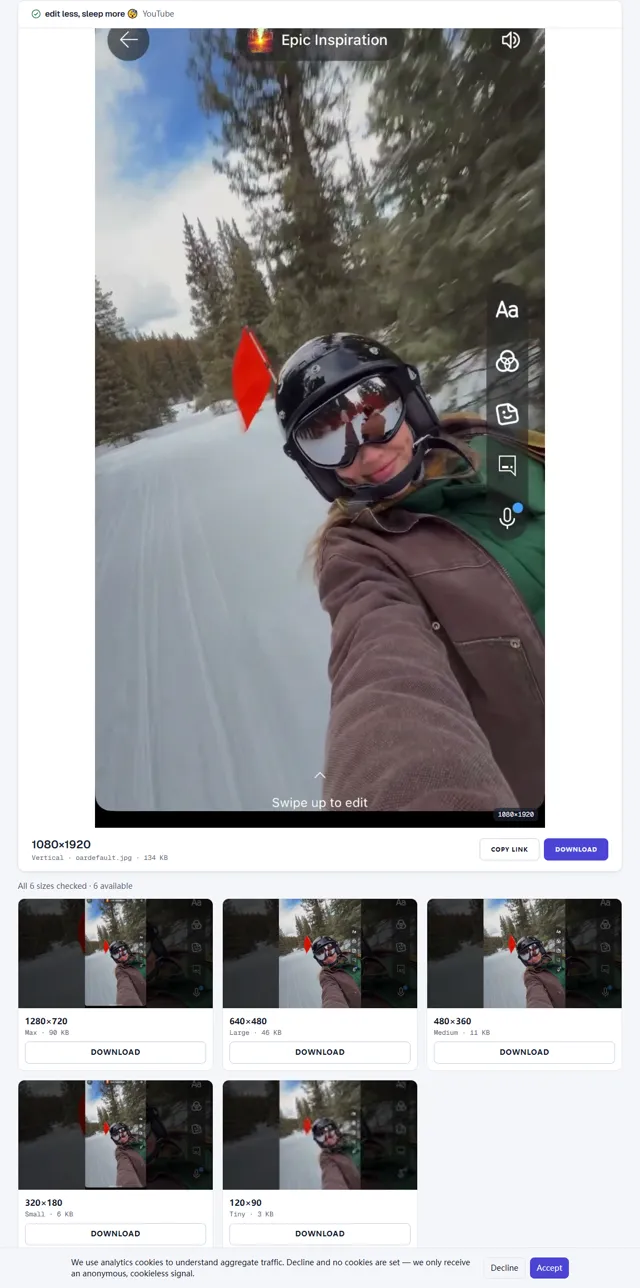
Three things stand out. The vertical file is 1080×1920 — half the recommended upload in each direction. All five landscape sizes existed for this Short as well. And those landscape files don't crop the Short: they place the vertical frame in the middle of a wider image and fill the sides with a darkened, enlarged copy of the same frame.
That last detail is worth designing for. Any page or app that requests one of the landscape files for a Short shows your thumbnail as a narrow strip in the center. Big, centered subjects survive it; text near the top or bottom edge of a 9:16 design often does not. A regular video has no vertical file at all; the downloader marks it as missing instead of stretching the landscape image.
Why 640×480 Has Black Bars
Two of the thumbnail files YouTube serves are 4:3, not 16:9: 640×480 and 480×360. A 16:9 thumbnail placed in a 640×480 frame fills only 640×360 of it, leaving 60 px bars above and below. The same happens at 480×360, where the picture is 480×270. In the Short we checked, the 4:3 files carried the same centered vertical frame with darkened sides as the other landscape sizes, so the sharp part of the picture was narrower still.
Those bars are part of the file, not a display glitch, so a design tool or older app that requests one of these sizes shows them. If you reuse your own thumbnail elsewhere, start from the 1280×720 file or your original export. The downloader page explains every available resolution and which videos have each.
Check Your Thumbnail After Upload
Once a video is live, you can see exactly which files YouTube made from your upload. Paste the video link into our thumbnail downloader: it requests each size from YouTube's CDN and shows only the ones that exist, with their real pixel sizes. If your custom thumbnail went through, the Max file shows your design rather than a frame from the video.
Two quick checks are worth doing there. Open the Tiny file, since that is roughly how your design competes in a crowded sidebar. Then open one of the 4:3 files to see how it looks with bars. If either one loses the subject, adjust the design and upload again — the YouTube thumbnail dimensions stay the same, only the layout inside them changes.
Export Checklist
Each of the common YouTube thumbnail dimensions you might export, and the largest file YouTube serves back:
| You export | Largest public file | Notes |
|---|---|---|
| 3840×2160 (16:9) | 1280×720 | Recommended; clean one-third reduction |
| 1920×1080 (16:9) | 1280×720 | Fine for photos; check thin text |
| 1280×720 (16:9) | 1280×720 | Meets the minimum; nothing to spare |
| 2160×3840 (9:16 Short) | 1080×1920 vertical | Plus five landscape files with the frame centered |
Before you upload, run through four checks:
- The aspect ratio is exactly 16:9 (or 9:16 for a Short), so nothing is cropped or padded.
- The file is JPG or PNG, and under 2 MB if you're uploading from a phone.
- Nothing important sits in the bottom-right corner, where YouTube overlays the video length in search and recommendations.
- The main subject still reads at 120×90, the smallest file YouTube serves — shrink your design to that size and look at it.
Designing a profile picture or banner as well? See the YouTube image sizesguide and our YouTube channel banner size guide.
Frequently Asked Questions
What are the YouTube thumbnail dimensions?
YouTube recommends 3840×2160 px at a 16:9 aspect ratio, with a minimum width of 640 px, as a JPG or PNG. The largest thumbnail file YouTube serves publicly is 1280×720.
Is 1280×720 still the right YouTube thumbnail size?
It still works: it's 16:9, above the 640 px minimum, and it matches the largest file YouTube serves. It is no longer what YouTube recommends, though — the custom thumbnail page now asks for 3840×2160.
What size is a YouTube Shorts thumbnail?
YouTube recommends 2160×3840 px at 9:16 for Shorts, with a minimum height of 640 px. On the public CDN, the vertical Shorts file is 1080×1920. In the Short we checked, the landscape sizes showed the vertical frame in the middle of a wider image.
Why does my YouTube thumbnail have black bars?
You are probably looking at the 640×480 or 480×360 file. Those two sizes are 4:3, so a 16:9 thumbnail fills only the middle of the frame — 640×360 of the 640×480 file — with bars above and below.
Can I download a YouTube thumbnail larger than 1280×720?
Not for a regular video — 1280×720 is the largest public file, even if the creator uploaded 3840×2160. Most Shorts also have a 1080×1920 vertical file. Our YouTube Thumbnail Downloader shows which sizes exist for any video.
Sources
- YouTube Help — Add custom thumbnails on YouTube
Last verified: 2026-09-26